
CustomGuide courses offer structured, interactive learning with modules and skills, guiding you from basics to advanced topics.
-
The Course tab is the main learning hub for learners. Here’s what it includes:
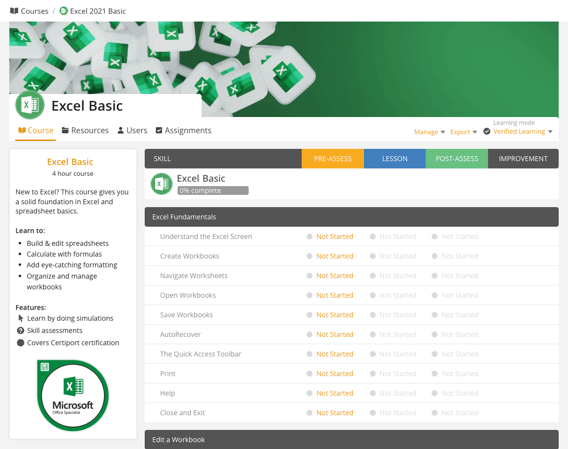
- Course Details – Shows the course title, description, duration, and key features.
- Course Overview – Tracks learner progress through pre-assessment, lessons, post-assessment, and improvement with a progress bar.
- Modules and Skills – Displays course modules and associated skills for a clear learning path.
- Progress Tracking – Uses status labels like Not Started, Skip, Complete, Pass, or Fail to monitor progress.
- Learning Mode – Shows different learning modes such as verified learning, assessments, skills gaps, lessons, or practice tests.
-
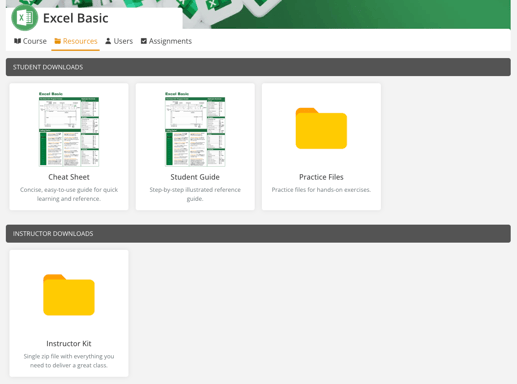
The Resources tab offers course materials for students and instructors:
-
Student Guide: An illustrated guide covering course topics.
-
Practice Files: Exercises for hands-on learning.
-
Course Outline: A detailed list of course topics.
-
Cheat Sheet: A cheat sheet with shortcuts and tips.
-
Instructor Kit: A complete resource package for instructors, including teaching aids and lesson plans.
-