
-
Go to the copied course you created.
-
Click the Learning Mode dropdown at the top-right corner.

-
Select the desired learning mode from the list.
-
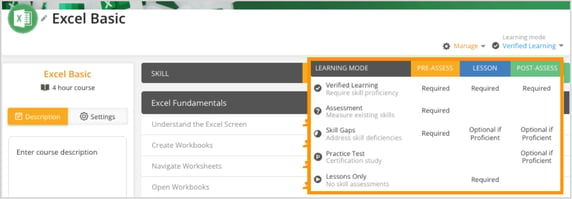
Each learning mode has different requirements for pre-assessments, lessons, and post-assessments, which are shown in the chart for reference.
-
Verified Learning: Requires pre-assessment, lesson, and post-assessment to ensure skill proficiency.
-
Assessment: Requires only a pre-assessment to measure existing skills, with no lessons or post-assessments.
-
Skill Gaps: Requires a pre-assessment, with lessons and post-assessments optional if the learner is already proficient.
-
Practice Test: Requires a pre-assessment, with lessons and post-assessments optional if proficient, often used for certification study.
-
Lessons Only: Requires only lessons, with no pre-assessments or post-assessments.

-
-
Once selected, the course will automatically adjust based on the selected learning mode.