
-
Go to the copied course you created.
-
At the bottom of the course outline, click the + icon next to Add Module to open the dropdown menu.

-
To add an existing module:
-
Select Existing Module from the dropdown menu.
-
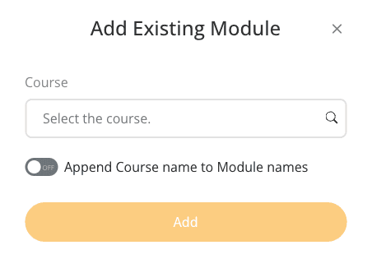
In the Add Existing Module window, search for and select the Course containing the module.
-
Choose the Module from that course.
-
(Optional) Toggle Append Course Name to Module Names to include the original course name in the module title.
-
Click Add to include the module in your course outline.
-
-
To add an existing course:
- Select Existing Course from the dropdown menu.
- In the Add Existing Course window, search for and select the Course you want to link.
- (Optional) Toggle Append Course Name to Module Names to include the course name in module titles.
- Click Add to link the entire course as a module in your outline.
